
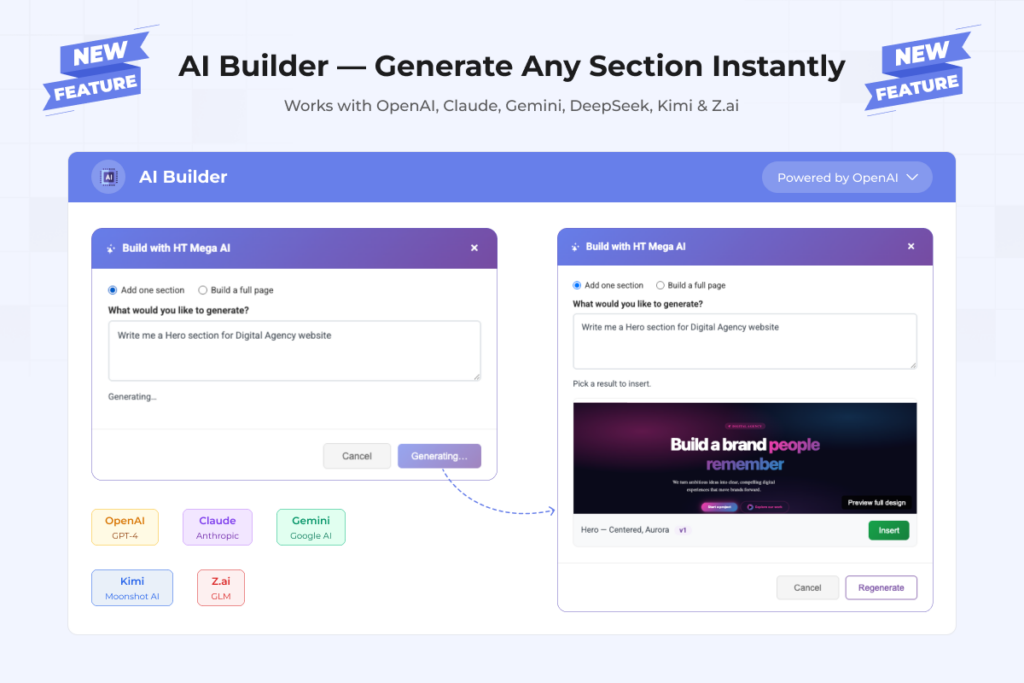
✨ NEW: One AI Toolkit Write Copy & Build Sections

Write and Build with AI - Right Inside Elementor

Rewrite any text field instantly, or generate a full section - even a whole page from a single prompt. Powered by OpenAI, Claude, Gemini, DeepSeek, Kimi, or Z.ai. Bring your own API key, no subscriptions.

ht mega ai builder
0K+

Active Users

0

Ready-to-Use Sections

0

AI Engines

0%

Free to Use

See HT Mega AI Write and Build in Seconds

Watch how HT Mega AI rewrites existing copy in place, and turns a single prompt into a fully designed, ready-to-edit section or an entire page.

Why HT Mega AI?

Everything You Need to Write and Build with AI

One toolkit for rewriting copy in place and generating fully designed sections or whole pages.

Simple Process

Get Started in 4 Easy Steps

No technical expertise required. Start writing or building with AI in minutes.

1

Add Your API Key

Enable AI Builder in HT Mega settings and add your API key from OpenAI, Claude, Gemini, DeepSeek, Kimi, or Z.ai.

2

Pick a Mode

Rewrite text with the “Write with AI” button on any field, or click the sparkle “Build with AI” button on an empty section.

3

Describe What You Want

A better headline, a full section, or a whole page describe it in plain language. Be specific for best results.

4

Preview & Apply

Pick your favorite text variation, or preview the real rendered section and insert it as a draft.

Powered By

Choose Your Preferred AI Engine

All six engines deliver exceptional results for writing copy and building sections. Pick the one that works best for you.

Quick Answers

Common Questions

Ready to Write and Build Faster with AI?

Join thousands of users writing copy and building sections with HT Mega AI.

Scroll to Top