

Quick Answer
About 21% of WooCommerce placed carts get abandoned, though broader ecommerce studies put overall abandonment near 70%. To reduce it, simplify checkout, show costs upfront, allow guest checkout, add express payment options, remove trust concerns before payment, and follow up with timed recovery emails. Some abandonment, from browsing alone, can’t be prevented.
If you run a WooCommerce store, you’ve almost certainly watched shoppers add items to their cart and then vanish before paying. It’s one of the most common and most frustrating problems in ecommerce, and it’s rarely caused by a single issue.
Learning how to reduce cart abandonment in WooCommerce starts with understanding why shoppers leave and where your own checkout is losing them.
This guide walks through what cart abandonment actually means for a WooCommerce store, why shoppers leave before checkout, and 12 practical strategies you can apply to reduce it in 2026. You’ll also see how to diagnose your own store’s specific drop-off point before you start making changes, since not every tactic applies equally to every store.
Table of Contents
What Is Cart Abandonment in WooCommerce?
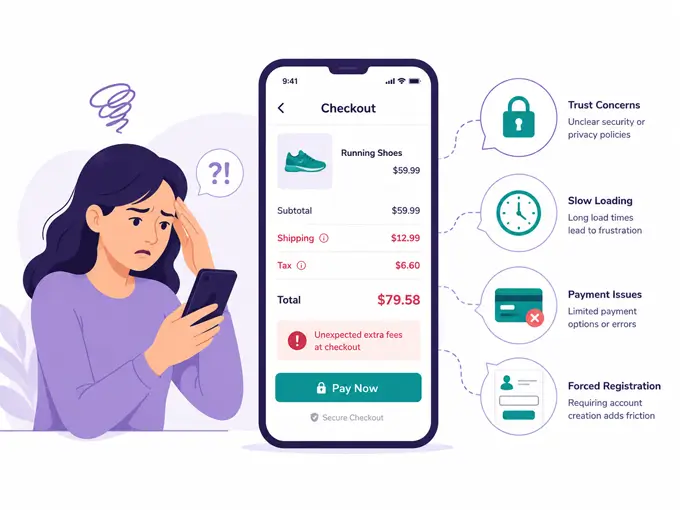
Cart abandonment happens when a shopper adds a product to their WooCommerce cart but leaves the site before finishing checkout. It’s different from “browse abandonment,” where a visitor never adds anything to the cart at all.
You calculate your abandonment rate with a simple formula:
Cart Abandonment Rate = (Carts Created − Completed Orders) ÷ Carts Created × 100For example, if your store logs 1,000 carts in a month and only 300 turn into orders, your abandonment rate is 70%. Tracking this number monthly lets you see whether the changes you make below are actually working.
Why the Number Looks Different Depending on the Source
You’ll see cart abandonment quoted anywhere from 21% to over 70%, and both figures are accurate — they just measure different things using different methodologies.
Metorik’s 2026 benchmark report, based on 6,000+ WooCommerce stores and 65 million-plus orders placed in 2025, found a 21% abandonment rate for placed carts, with clothing stores running as high as 34% and lower-friction categories as low as 7% (Metorik, 2026).
Long-running research that tracks abandonment across broader ecommerce checkout funnels, including guest sessions, puts the global average at 70.19%.
The 21% figure is a useful benchmark specifically when your own analytics measures “placed carts” in a similar way to Metorik’s methodology. If your tracking definition is closer to Baymard’s broader funnel measurement, expect a higher number. Use whichever definition matches how your analytics tool counts a “cart.”
Why Do Shoppers Abandon Their WooCommerce Cart?
Before fixing anything, it helps to know what’s actually driving people away. The most common reasons, backed by industry research, are:
- Unexpected costs like shipping, taxes, or fees shown only at the final step
- Being forced to create an account before checkout
- A checkout process that’s too long or too complicated, cited by 17% of US online shoppers (Baymard Institute, 2025).
- Lack of trust in providing payment information, especially on unfamiliar sites
- Slow page load speed or a buggy checkout
- Limited payment options, especially no digital wallets
- Simply comparison shopping with no real intent to buy yet — the single largest reason, cited by 42% of shoppers.
Since a large share of abandonment comes from shoppers who weren’t ready to buy in the first place, no checkout fix will eliminate abandonment entirely. Focus your effort on the friction you can actually control.
Find Where Shoppers Are Dropping Off First
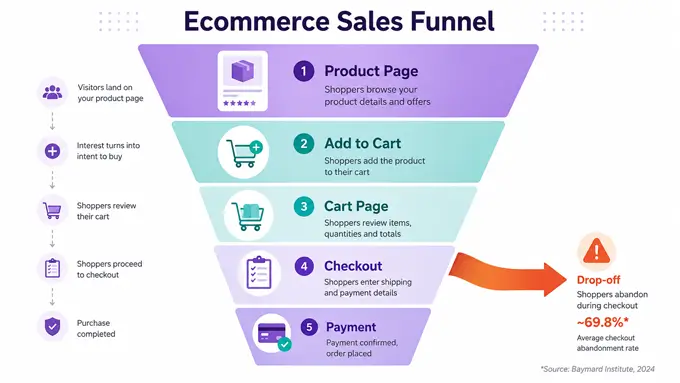
Before applying any tactic below, diagnose your own funnel. Cart abandonment tactics work best when they target your store’s actual weak point, not a generic list of best practices.
Map your funnel in stages: Product page → Add to Cart → Cart page → Checkout → Payment → Order confirmation. Then compare drop-off rates by:
- Device (mobile vs. desktop)
- Traffic source (paid ads vs. organic vs. email)
- Checkout step (which field or page shoppers stall on)
- Payment method (do certain gateways fail more often?)
- Shipping region (do international shoppers abandon at the shipping step?)
Analytics funnel reports and your store’s own order data are enough to get started. Once you know where the drop-off concentrates, the strategies below become a lot more targeted.
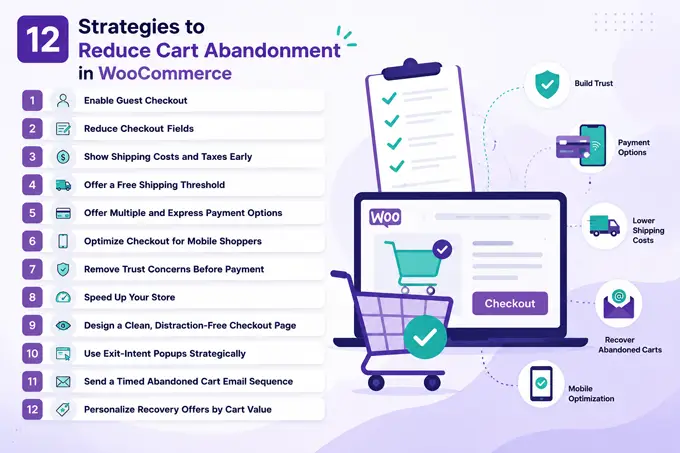
12 Practical Strategies to Reduce Cart Abandonment in WooCommerce
Prevent Abandonment Before It Happens
1. Enable Guest Checkout
Forcing account creation is one of the fastest ways to lose a sale. Go to WooCommerce > Settings > Accounts & Privacy and turn on “Allow customers to place orders without an account.” Offer account creation as an optional step after the purchase, not before it.
2. Cut Your Checkout Fields Down to Essentials
Every extra field is a reason to bounce. Stick to name, email, shipping address, and payment details. A checkout field editor plugin or your theme’s checkout settings can help you remove anything non-essential, like a “Company Name” field most stores don’t need.
3. Show Shipping Costs and Taxes Early
Unexpected fees at the final step are consistently cited as a top reason shoppers abandon carts. Enable the shipping calculator on your Cart page (WooCommerce > Settings > Shipping) and turn on customer geolocation so shipping estimates appear as early as possible.
4. Offer a Free Shipping Threshold
If free shipping across the board isn’t realistic, set a threshold like “Free shipping on orders over $50.” This nudges average order value up while removing the shipping-cost objection for most carts.
5. Offer Multiple and Express Payment Options
Not every shopper wants to type in a card number. Add a familiar wallet option, and enable express payment options like Apple Pay and Google Pay through a supported payment gateway, plus a buy-now-pay-later option if it fits your audience. More payment choices, especially one-tap express checkout, reduce friction at the exact moment shoppers are deciding whether to finish or leave.
6. Optimize Checkout for Mobile Shoppers
Mobile now accounts for the majority of WooCommerce traffic; Metorik’s 2026 dataset found that 72% of WooCommerce orders were placed on mobile devices (Metorik, 2026). A checkout that’s hard to use on a small screen is a direct cause of abandonment. Focus on:
- Large, easy-to-tap buttons and form fields
- Autofill support for address and payment fields
- Keyboard types matched to the field (numeric for phone/card, email for email)
- No horizontal scrolling or zoomed-in text
- A visible order total and CTA button without excessive scrolling
7. Remove Trust Concerns Before Payment
Shoppers hesitate to hand over payment details on a site that feels unfamiliar or unclear. Address this with:
- Recognizable, well-known payment methods
- Transparent return and refund information
- Clear delivery time expectations
- Visible contact or support access
- Plain-language privacy and security statements
- Genuine customer reviews
- No surprise charges appearing at the final step
8. Speed Up Your Store
A slow cart or checkout page kills conversions before a shopper even sees your offer. Compress images, use a caching plugin, and choose quality hosting. If your Elementor-built pages feel heavy, disable unused widgets in your builder’s settings panel to shed unnecessary asset loading, and load only the elements you actually use on each page.
9. Design a Clean, Distraction-Free Checkout Page
Strip your checkout page of navigation menus, unrelated links, and pop-ups that pull attention away from completing the order. If you build your store pages in Elementor, use a focused single-column layout on the cart and checkout templates. Save social-proof elements like recent-purchase popups for your product and shop pages instead of the checkout itself, so the final step stays distraction-free.
Recover Carts That Are Already Abandoned
10. Use Exit-Intent Popups Strategically
When a visitor’s cursor moves toward the back button, an exit-intent popup with a small discount or a reminder of their cart contents can be the last nudge that keeps them on the page. Use this sparingly — overused popups annoy repeat visitors more than they convert new ones.
11. Send a Timed Abandoned Cart Email Sequence
A short, well-timed email series is a common approach to recovering abandoned carts:
| Timing | Goal | |
|---|---|---|
| Reminder | Around 1 hour after abandonment | Recover distracted shoppers, no pressure |
| Follow-up | Around 24 hours later | Address hesitation, mention reviews or limited stock |
| Final follow-up | 48–72 hours later | Use a small incentive selectively, not automatically |
Treat this schedule as a recommended starting point to test against your own audience, not a universal best practice. A dedicated abandoned cart recovery plugin or a marketing automation tool can handle the sending on autopilot.
12. Personalize Your Recovery Offers by Cart Value
Not every abandoned cart deserves the same discount. Reserve larger incentives for high-value carts to protect margins, and start recovery emails without any discount at all — many shoppers return without needing one.
How HT Mega Can Support a Better WooCommerce Shopping and Checkout Experience

HT Mega is an Elementor add-on, so it’s worth being clear about what it can and can’t do for cart abandonment. It doesn’t replace WooCommerce’s own settings, payment gateways, or email automation — but a few of its widgets and modules can improve how your cart and checkout pages look and feel, which supports several of the strategies above.
What HT Mega can help with:
- WC: Pages widget — lets you visually customize the checkout page (labels, input fields, payment area, order review) and the cart page (cart table, quantity inputs, coupon and update buttons, checkout button) directly in Elementor, without touching the theme’s default templates.
- WC: Add To Cart widget — customizes product selection, quantity controls, and button presentation on product pages.
- Advanced Sticky module — a Pro-only module that makes any widget or section, including the Add to Cart button, stay visible while a shopper scrolls a long product page.
- Sales Notification module — available in both the free and Pro versions (with additional options in Pro), it displays recent-purchase popups to build social proof. It’s best used on product and shop pages rather than checkout, to avoid distracting shoppers at the final step.
What HT Mega does not do:
- It doesn’t manage payment gateways, guest checkout settings, or shipping calculations; those live in WooCommerce’s own settings.
- It doesn’t send abandoned cart recovery emails; that requires a dedicated recovery plugin or email automation tool.
- It doesn’t remove or manage checkout form fields; that’s handled through WooCommerce or a checkout field editor.
If you’re already customizing WooCommerce product pages with Elementor, our guide on building a high-converting WooCommerce product page with Elementor covers the layout choices that pair well with this checkout setup.
Frequently Asked Questions
What is a good cart abandonment rate for WooCommerce?
A rate below about 20% for placed carts is generally strong, though benchmarks vary by category, apparel stores, for example, run naturally higher than lower-friction categories.
Why do people abandon their cart in WooCommerce?
The top reasons are simply not being ready to buy, unexpected costs at checkout, forced account creation, and a checkout process with too many steps or fields.
Does guest checkout actually reduce cart abandonment?
Yes. Removing the requirement to create an account before purchase lowers friction and is one of the most cited fixes across ecommerce research.
How soon should I send an abandoned cart recovery email?
A recommended starting point is a first reminder within 1-3 hours, a second email at 24 hours, and a final incentive-based email at 48-72 hours, tested and adjusted against your own audience.
Can HT Mega help optimize a WooCommerce checkout page?
HT Mega’s WC: Pages widget can style checkout labels, inputs, payment areas, order reviews, and cart tables. Payment setup, guest checkout, and recovery emails still require WooCommerce settings or other tools.
Conclusion
Reducing cart abandonment in WooCommerce isn’t about one big fix — it’s a combination of diagnosing where shoppers actually drop off, removing friction at checkout, being upfront about costs, and following up with a well-timed recovery sequence.
Start with the changes that address your store’s specific drop-off point, measure your abandonment rate monthly, and layer in the rest over time.
If your cart and checkout pages are built in Elementor, the WC: Pages widget guide is a good next step for styling a cleaner, more trustworthy checkout flow.