
Overview
The Wrapper Link module in HT Mega lets you turn any Elementor section, column into a clickable link. It’s an easy way to make entire areas—like banners, boxes, or images—link to a URL without using separate button elements.
Key Benefits
- Clickable Sections: Make any container or widget linkable.
- Improved UX: Users can click anywhere, not just buttons.
- Flexible Use: Works with headings, images, columns, or sections.
- SEO-Friendly: Supports custom attributes like
nofollowortarget="_blank". - Lightweight: Adds no extra load or complexity to your page.
How to Enable Wrapper Link
Step 1: Access HT Mega Modules and Activate it.
- From your WordPress Dashboard, go to HTMega Addons → Settings.
- Open the Modules tab.
- Find Wrapper Link in the list (see screenshot).
- Toggle the Wrapper Link switch ON.
- Click Save Settings at the bottom of the page.
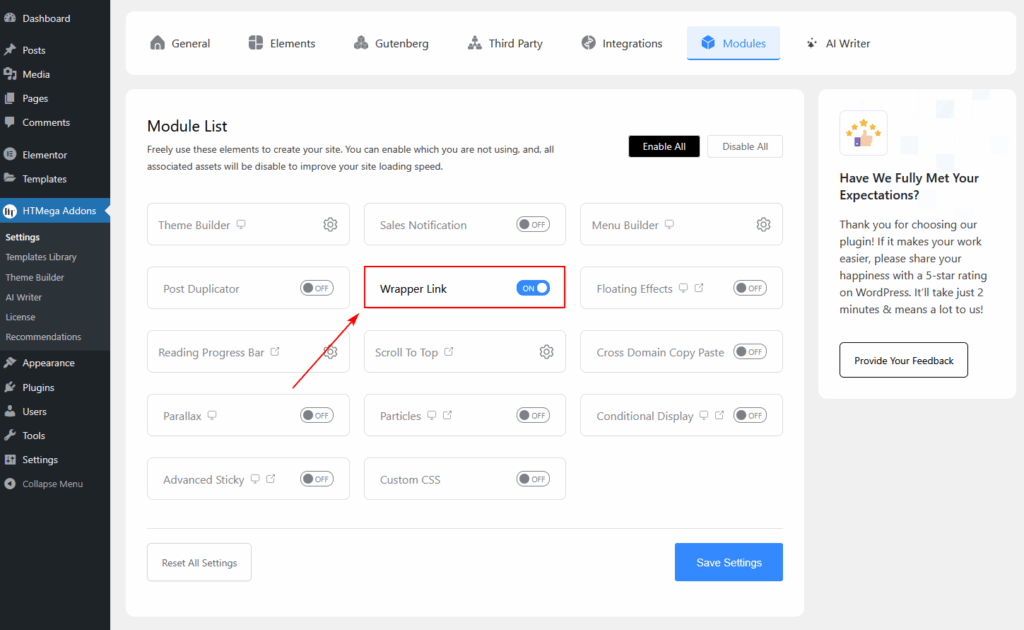
The Wrapper Link feature will now be available in your Elementor editor.
How to Use Wrapper Link in Elementor
- Open Your Page in Elementor.
- Select Any Widget, Column, or Section.
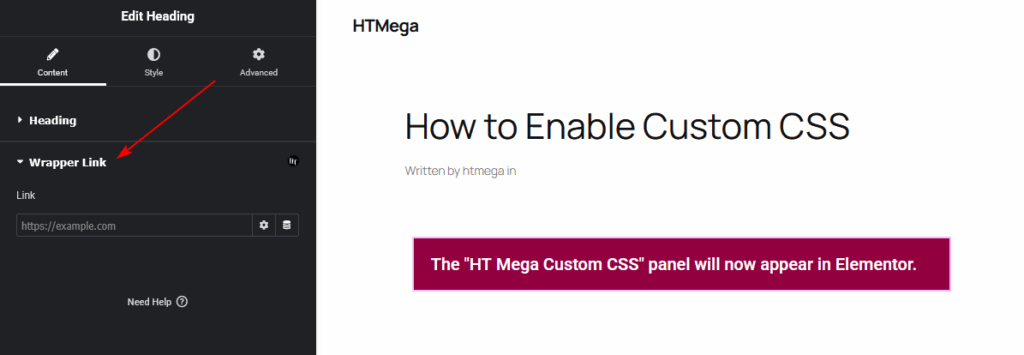
- In the Edit Panel, you’ll find a Wrapper Link option.
- Enter your destination URL in the “Link” field (e.g.,
https://example.com). - Optional Settings:
- Open in new window: Opens link in a new browser tab.
- Add nofollow: Prevents search engines from following the link.
- Custom Attributes: Add attributes like
key|value, rel|sponsoredSeparate multiple attributes with commas.
- Update or Publish your page.
Now, the selected section or widget will function as a clickable link.
Example Use Cases
- Make entire promo boxes or banners link to product pages.
- Turn feature columns into clickable navigation elements.
- Create custom image-based call-to-actions without extra buttons.
- Use for portfolio grids or team member cards that link to details.
Tips & Best Practices
✅ Use nofollow for affiliate or external links.
✅ Always open in new window for external websites.
✅ Test the link after applying to ensure the entire section is clickable.
✅ Avoid nesting multiple clickable elements inside one wrapper link.
Troubleshooting
Wrapper Link not appearing in Elementor panel:
- Ensure the module is enabled in HTMega → Modules.
- Clear your browser and WordPress cache.
- Update Elementor and HT Mega to the latest version.
Link not working on frontend:
- Check for overlapping sections or z-index conflicts.
- Confirm the URL is correct and uses proper formatting (
https://).
Summary
The Wrapper Link module adds convenience and flexibility by turning any Elementor section or widget into a clickable link. It’s perfect for banners, feature blocks, and creative layouts where you want the entire area to lead users to a specific destination—without extra code or plugins.